# Making an accessible Breadcrumb Navigation using TailwindCSS and NextJS
Breadcrumb Navigations are starting to appear in many applications nowadays, mostly in dashboards. Today we are going to look at building a Breadcrumb navigation that is accessible and styled with TailwindCSS. We are going to be using NextJS (specifically the [NextJS Router](https://nextjs.org/docs/api-reference/next/router)) for this tutorial. However, you can follow the same steps for other frameworks, it may also not be a React framework. Just make sure to look up and implement the proper router logic and create the components properly, styling will remain the same.
## 🍞 Ok, what is a Breadcrumb Navigation?
You must have come across navigation bars, something like this -


The first example is from the [Vercel](https://vercel.com/) dashboard and the second one is from the [Netlify](https://www.netlify.com/) dashboard.
We can see that it gives us a brief idea of what page we are on and also lets us navigate back easily (yes, those breadcrumb items are usually links).
At times, these Breadcrumb Links also have an associated dropdown, something like this -
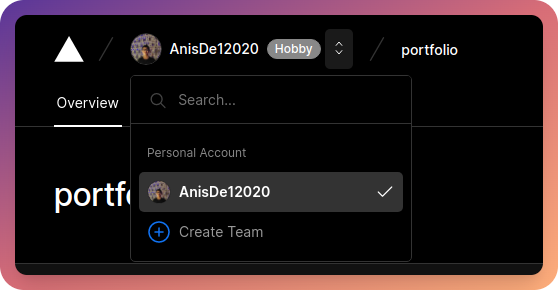
We will not be building this today as it is a more advanced use case, however, in larger projects, it will be a useful thing to have as it makes navigation easier.
## Initializing a NextJS application with TailwindCSS
First of all, let us create a new NextJS application
```
npx create-next-app breadcrumb-example
# OR
yarn create next-app breadcrumb-example
```
Now, let us remove some of the boilerplate code and existing CSS (except the `global.css` file) as we are going to be adding TailwindCSS.
A cleaned up `pages/index.js` will look like this -
```jsx
import Head from "next/head";
export default function Home() {
return (
NextJS Breadcrumb Example
Breadcrumb Navigation Example with NextJS
);
}
```
Also, delete `Home.module.css` under the `styles` directory.
### Adding TailwindCSS
We are going to be simply following the office guide on [adding TailwindCSS to a NextJS application](https://tailwindcss.com/docs/guides/nextjs).
First of all, let us install TailwindCSS, PostCSS, and AutoPrefixer -
```
npm install -D tailwindcss postcss autoprefixer
# OR
yarn add -D tailwindcss postcss autoprefixer
```
Also, run the following command to generate the `tailwind.config.js` and `postcss.config.js` files -
```
npx tailwindcss init -p
```
Now, replace the `tailwind.config.js` file with the following -
```js
module.exports = {
content: [
"./pages/**/*.{js,ts,jsx,tsx}",
"./components/**/*.{js,ts,jsx,tsx}",
],
theme: {
extend: {},
},
plugins: [],
}
```
Now, add the following code to the `globals.css` file under the `styles` directory -
```css
@tailwind base;
@tailwind components;
@tailwind utilities;
```
For this example, I am going to go for a dark mode version, just so that the screenshots I take are easy on the eyes. For this, I will add this to my `globals.css` file -
```css
@layer base {
body {
@apply bg-black text-white;
}
}
```
I am also going to add some styles to the `h1` tag we added earlier in the `index.js` file -
```html
Breadcrumb Navigation Example with NextJS
```
This is what the website looks like now -

## Building the Breadcrumb Navigation
Time for the fun part, let us build the breadcrumb navigation!
Let us make a new directory called `components`. This is where we will be putting in our `Breadcrumb` and `BreadcrumbItem` components.
Now, let us make the Breadcrumb. Create a file called `Breadcrumb.jsx` and add the following code -
```jsx
import { Children } from "react";
import { Fragment } from "react/cjs/react.production.min";
const Breadcrumb = ({ children }) => {
const childrenArray = Children.toArray(children);
console.log(childrenArray);
const childrenWtihSeperator = childrenArray.map((child, index) => {
if (index !== childrenArray.length - 1) {
return (
{child}
/
);
}
return child
});
return (
);
};
export default Breadcrumb;
```
Let us go over this code step by step. First of all, we make a new component called `Breadcrumb`. We are accepting one prop, that is the children. These children will include the Breadcrumb Items, that is the links to the pages.
We then convert the children into an array using the [`Children.toArray()` function](https://reactjs.org/docs/react-api.html#reactchildrentoarray).
If we log the `childrenArray` variable to the console, we should see something like this -
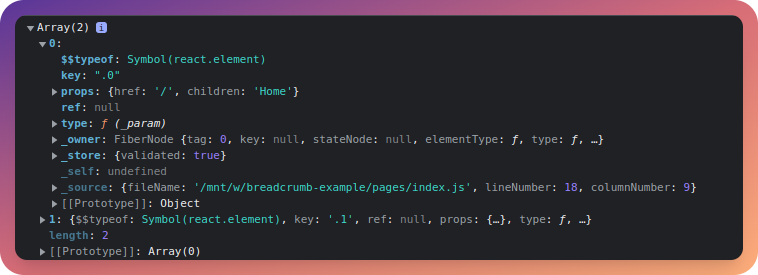
Here, we can see that it contains all the metadata about the component such as the props, component type, etc.
Next, we take this array and map over it. We check if it is the last element of the array by comparing the `index` of the element with the length of the array. If it is not the last element, we return it as a [React Fragment](https://reactjs.org/docs/react-api.html#reactfragment) with the child element itself, as well as a separator (`/` in this case as it is the most common one but you can change it as well). If it is the last element of the array, we just return the element, without the separator.
Next, the Breadcrumb component returns a `nav` element with an order list (`ol`). The ordered list is a flexbox and the `space-x-4` class adds a margin of `1 rem` between all children elements (the breadcrumb items in this case).
Lastly, we export the component to be used later.
Now, let us create another file called `BreadcrumbItem.jsx` and add the following code to it -
```jsx
import Link from "next/link";
const BreadcrumbItem = ({ children, href, ...props }) => {
return (
);
};
export default BreadcrumbItem;
```
Here, we are creating a new component called `BreadcrumbItem` which takes in a `children` and a `href` prop. We also take in additional props which will be passed into the `li` prop. Do note that each `BreadcrumbItem` is a list item and hence it fits in the ordered list we created earlier in the `Breadcrumb` component.
Time to add the Breadcrumb to our application. For the time being, let us add the following code to our `index.js` file under `pages` -
```html
HomeHome
```
Also, don't forget the imports
```jsx
import Breadcrumb from "../components/Breadcrumb";
import BreadcrumbItem from "../components/BreadcrumbItem";
```
This is what the home page should look like now -

Right now, we are rendering the breadcrumb on the home page and hardcoding the page names. However, this is not what we should be doing, let us look at a better approach where the routes are inferred using the router component.
## Dynamically creating the breadcrumb items
Till now, we were manually passing in the breadcrumb items into the `Breadcrumb` component. However, this approach is not suitable for larger applications.
I have made some changes to the `_app.js` file to dynamically create the breadcrumb items -
```js
import { useRouter } from "next/router";
import { useEffect, useState } from "react";
import "../styles/globals.css";
import Breadcrumb from "../components/Breadcrumb";
import BreadcrumbItem from "../components/BreadcrumbItem";
function MyApp({ Component, pageProps }) {
const router = useRouter();
const [breadcrumbs, setBreadcrumbs] = useState();
useEffect(() => {
const pathWithoutQuery = router.asPath.split("?")[0];
let pathArray = pathWithoutQuery.split("/");
pathArray.shift();
pathArray = pathArray.filter((path) => path !== "");
const breadcrumbs = pathArray.map((path, index) => {
const href = "/" + pathArray.slice(0, index + 1).join("/");
return {
href,
label: path.charAt(0).toUpperCase() + path.slice(1),
};
});
setBreadcrumbs(breadcrumbs);
}, [router.asPath]);
return (
<>
Home
{breadcrumbs &&
breadcrumbs.map((breadcrumb) => (
{breadcrumb.label}
))}
);
}
export default MyApp;
```
Let us go through this code. First of all, we are importing the NextJS router, [the `useEffect` hook](https://reactjs.org/docs/hooks-effect.html), [the `useState` hook](https://reactjs.org/docs/hooks-state.html), the `Breadcrumb` component and the `BreadcrumbItem` component. Also, you can remove the Breadcrumb component from the `index.js` file.
Then, inside the `MyApp` component, we are initializing the router and creating a state to store out breadcrumbs. Next, we have an `useEffect` hook which fires when the page loads and whenever `router.asPath` changes.
In the `useEffect` hook, firstly, we remove the query parameters from our path (which we get from `router.asPath`). Next, we split it into an array called `pathArray` and call the [`shift()`](https://developer.mozilla.org/en-US/docs/Web/JavaScript/Reference/Global_Objects/Array/shift) function on it to remove the first element (which is the home route).
Next, we also filter it out so that we don't get any other blank path (this is because the NextJS router returns a blank element at the last index if we are on the home route).
After that, we [map](https://developer.mozilla.org/en-US/docs/Web/JavaScript/Reference/Global_Objects/Array/map) over it and generate a new array called `breadcrumbs`. The `breadcrumbs` array is an array of objects that contain the `href` and `label` for the breadcrumb items.
Lastly, we save it to the `breadcrumbs` state so that we can use it outside the `useEffect` hook.
Next, in the JSX, we add the `Breadcrumb` component and add a `BreadcrumbItem` for the home route to it.
Then, we make sure that the `breadcrumbs` array is not null and map over it, adding the other `BreadcrumbItem` components.
Now, to test it out, create a directory called `dashboard` under `pages` and add 2 files - `index.js` and `[id].js`.
Add the following code to `index.js` -
```jsx
import Head from "next/head";
const Dashboard = () => {
return (
Dashboard | NextJS Breadcrumb Example
Breadcrumb Navigation Example with NextJS - Dashboard Page
);
};
export default Dashboard;
```
Now, add the following code to `[id].js` -
```jsx
import Head from "next/head";
const Project = () => {
return (
Dynamic Route | NextJS Breadcrumb Example
Breadcrumb Navigation Example with NextJS - Dynamic Route Page
);
};
export default Project;
```
Now, let us head over to `/dashboard`
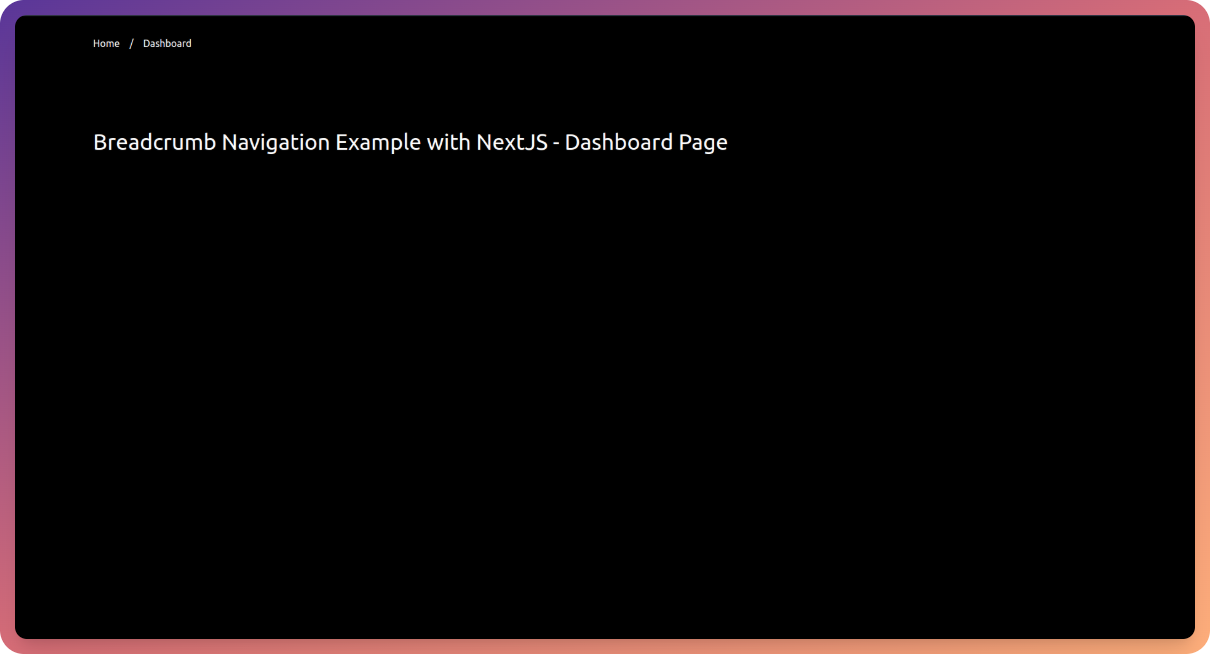
We can see that the breadcrumb works properly and the links work too!
Now let us head over to `/dashboard/test` and we can see that the breadcrumb displays the dynamic route -
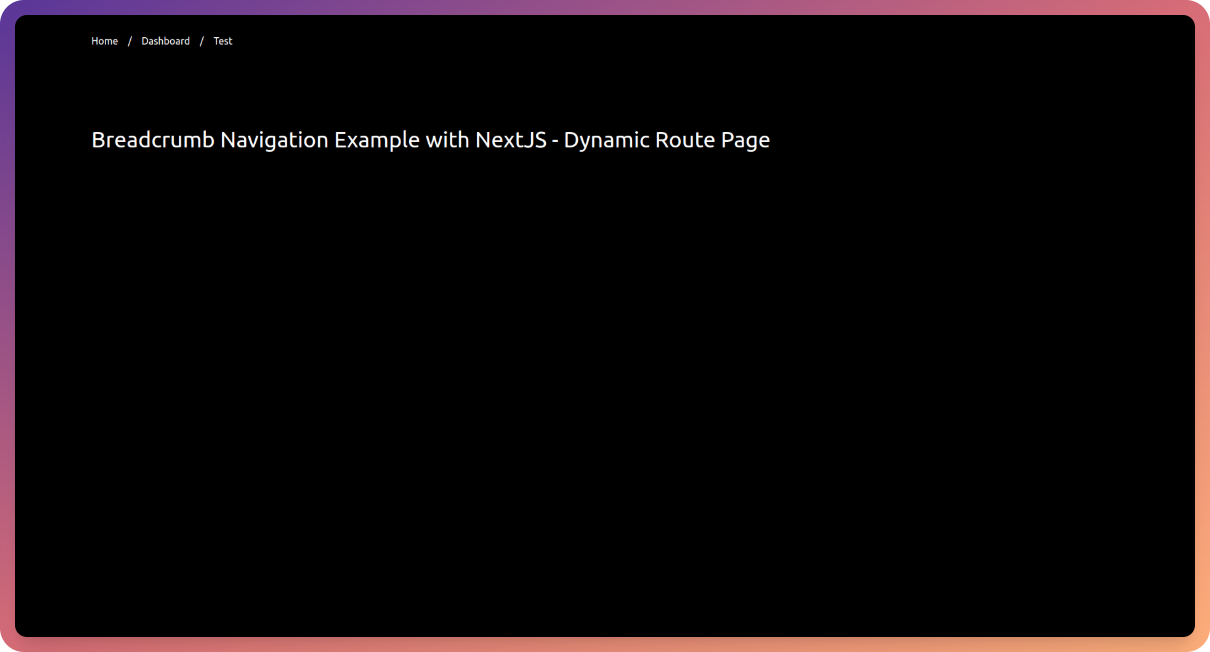
## Making it accessible
First of all, let us add an `aria-label` of value `breadcrumb` to our `Breadcrumb` component -
```jsx
import { Children } from "react";
import { Fragment } from "react";
const Breadcrumb = ({ children }) => {
const childrenArray = Children.toArray(children);
const childrenWtihSeperator = childrenArray.map((child, index) => {
if (index !== childrenArray.length - 1) {
return (
{child}
/
);
}
return child;
});
return (
);
};
export default Breadcrumb;
```
Now, let us make a small change to our `_app.js` to pass in a prop to the `BreadcrumbItem` called `isCurrent` with a boolean value. The value is true for the last breadcrumb item, that is, the current page.
```jsx
import { useRouter } from "next/router";
import { useEffect, useState } from "react";
import "../styles/globals.css";
import Breadcrumb from "../components/Breadcrumb";
import BreadcrumbItem from "../components/BreadcrumbItem";
function MyApp({ Component, pageProps }) {
const router = useRouter();
const [breadcrumbs, setBreadcrumbs] = useState();
useEffect(() => {
const pathWithoutQuery = router.asPath.split("?")[0];
let pathArray = pathWithoutQuery.split("/");
pathArray.shift();
pathArray = pathArray.filter((path) => path !== "");
const breadcrumbs = pathArray.map((path, index) => {
const href = "/" + pathArray.slice(0, index + 1).join("/");
return {
href,
label: path.charAt(0).toUpperCase() + path.slice(1),
isCurrent: index === pathArray.length - 1,
};
});
setBreadcrumbs(breadcrumbs);
}, [router.asPath]);
return (
<>
Home
{breadcrumbs &&
breadcrumbs.map((breadcrumb) => (
{breadcrumb.label}
))}
);
}
export default MyApp;
```
For the initial home route, we are simply matching `router.pathname` with `/`.
Now in the `BreadcrumbItem.jsx` file, change the code to the following -
```jsx
import Link from "next/link";
const BreadcrumbItem = ({ children, href, isCurrent, ...props }) => {
return (
);
};
export default BreadcrumbItem;
```
Here, we are setting `aria-current` to `page` if it is the current route.
## Conclusion
I hope you have a working Breadcrumb navigation now. Feel free to experiment with it and have a nice day 😁🤞
## 🔗 Important Links
- [Deployed Preview](https://nextjs-breadcrumb-example.vercel.app/)
- [GitHub Repository with the code](https://github.com/AnishDe12020/nextjs-breadcrumb-example)